
How to see which TikTok video made each sale
Where TikTok shows which post an order came from, and how to keep track across every post you make.
When you've posted dozens of videos for the same few products, a simple question gets surprisingly hard to answer: which video actually made this sale? It matters, because the answer tells you what to film more of. Here's where TikTok shows it, and how to keep track as your post count grows.
Where TikTok shows it
TikTok Shop Creator Center lists your affiliate orders. Each order shows what it came through: a video, a LIVE, your showcase or another source. For video orders, you can usually tell which post it was. That's the ground truth, and it's free.
The problem is scale. Checking one order is easy. Working out which of your 80 posts made the most money this month means going through every order, matching it to a post, adding up commission and keeping that up to date as refunds and returns come in.
How to track it yourself
- Give every post a short name. Something like "carpet cleaner, faceless demo, v2". Use the same name in your notes and spreadsheet.
- Once a week, go through new orders. For each order from a video, add a row: date, post, product, commission.
- Mark refunds and returns. Commission that gets reversed shouldn't count toward a post's total.
- Keep ad orders separate. When a shop runs your video as an ad, those orders pay a different rate. Mixing them in makes some posts look better or worse than they are.
- Sort by commission, not views. The posts that earn most aren't always the ones with the most views.
A month of this will show you which posts, products and formats really pay you. It's tedious, but it's the most useful spreadsheet a TikTok Shop creator can keep.
Things that make it confusing
- Not every order comes from a video. Buyers also find products in your showcase, on a LIVE or by search.
- Orders take time to settle. A sale today may be reversed by a return next week. See when TikTok Shop pays affiliates.
- One post can sell several products, and one product can sell through many posts.
How Ollexio helps
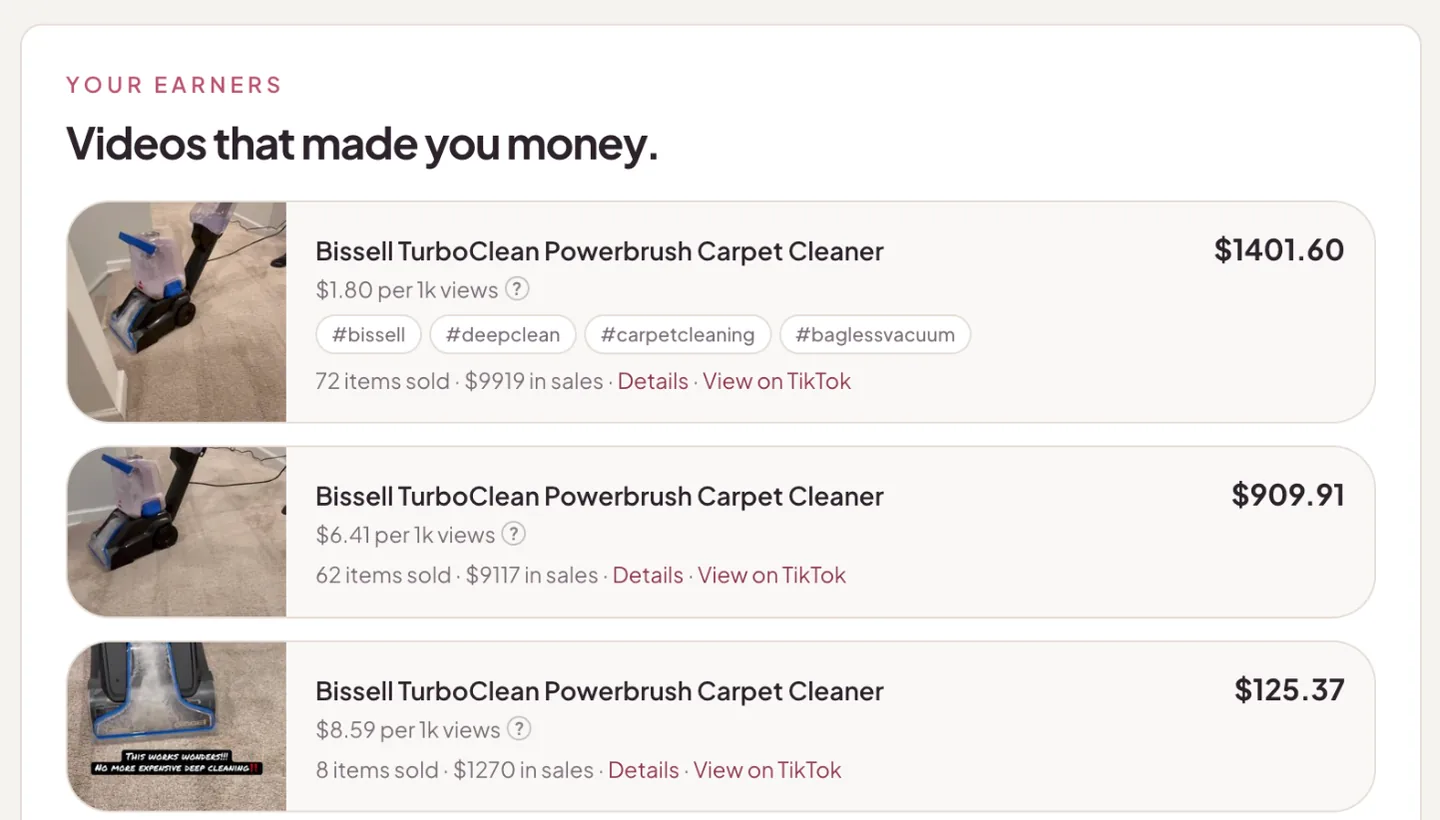
This is the spreadsheet Ollexio keeps for you, from your TikTok Shop affiliate orders through TikTok's official API.
- Every sale matched to its post, automatically, as orders sync. Refunds and returns are taken off.
- A "You made a sale" alert that opens the post that made it.
- Earnings by post and by product, with orders from your own posts and orders from shop ads kept apart.
- A money line on every post: what it's earned and how it ranks against your other posts.
You still post the videos. Ollexio just keeps the books on which ones pay.
Questions creators ask
Does TikTok show which video made a sale?
Yes, at the order level. Affiliate orders in TikTok Shop Creator Center show what drove the order, such as a video, a LIVE or your showcase. Lining that up across dozens of posts is the hard part.
Why doesn't a sale show a video?
Not every order comes from a video. Buyers also find products through your showcase, a LIVE or search. Those orders are real commission without a post attached.
Do sales from shop ads count toward my video?
Orders from a shop's ad that uses your video are tied to that video, but they pay the shop's Shop Ads rate. That's why it helps to see ad orders separately.